GameLearn 游戏英语学习工具
 执行者ssccinng发布 2026-10-27 11:14提交 2026-10-27 15:34更新 2026-10-27 15:34
作品下载
暂无下载暂无下载文件
作者尚未提供安装包或下载链接。
成果 · 第 3 版
更新于 2026-10-27 15:34GameLearn v0.2.10 是面向 Windows x64 游戏场景的 WPF 英语学习工具。发布包包含 .NET 运行时、本地 OCR 模型和 770,611 条 ECDICT 数据;本地识别与离线查词不要求 API 密钥。应用支持从普通游戏窗口或 OBS 来源识别英文,并保存单词、原句和场景以供复习。官方 PP-OCRv6 云端识别、DeepL/Azure 句子翻译和兼容 Chat Completions 的语境解释为可选配置。
- 技术方案
- 以 .NET 10 WPF 实现 Windows 桌面应用,使用本地 OCR 模型和随包 ECDICT 词典提供无需外部服务的识别与查词;在同一流程中接入普通窗口捕获或 OBS WebSocket 截图,并使用本地数据存储保留单词、原句与场景。在线 OCR、翻译和语境解释独立配置为可选能力。
运行与技术信息
- 运行平台
- Windows x64
- 技术栈
- C#.NET 10WPFWindows Graphics CaptureOBS WebSocketSQLiteRapidOcrNetONNX Runtime
- 运行或构建工具
- .NET SDK 10.0.400PowerShell build scripts
- 作品版本 / Commit
- 0.2.10
- 许可证
- 未填写
运行时使用的模型
- PP-OCRv5 LatinPaddleOCR, distributed via RapidOcrNet
Bundled local OCR model for Latin text detection, direction and recognition.
- PP-OCRv6PaddleOCR AI Studio
Optional hosted OCR model; requires a user-provided AI Studio access token.
环境与硬件要求
Windows x64, targeting net10.0-windows10.0.19041.0. The documented v0.2.10 distribution includes the .NET runtime, OCR model files and dictionary data. Running/building the source requires .NET SDK 10.0.400. OBS capture sources require OBS 28+ with obs-websocket enabled. Basic local OCR and dictionary lookup do not require external API credentials.
运行说明
在 Windows x64 上运行项目发布目录中的 publish\GameLearn-v0.2.10\GameLearn.exe。首次启动时保留同一目录中的运行时、OCR 模型和资源文件,不要单独移动 EXE。基本本地识别与离线词典无需 Python、系统英文 OCR 语言包或 API 密钥。OBS 画面来源需在 OBS 启用 obs-websocket 并从 GameLearn 的来源窗口选择。
使用说明
To run the documented v0.2.10 distribution, open publish\GameLearn-v0.2.10\GameLearn.exe on Windows x64 and keep the full directory together. To run the source checkout, use .NET SDK 10.0.400 from the repository root with dotnet run --project src/GameLearn. Select a game window or OBS source in GameLearn, then use manual or automatic recognition and click a recognized word to look it up and save its scene. OBS sources require obs-websocket enabled in OBS.
已知限制
The README notes that exclusive fullscreen, protected content and some specialized rendering windows may not be capturable; borderless mode or an OBS projector is recommended. Local OCR may misread special fonts, dynamic subtitles and proper nouns. Cloud OCR and translation/AI services require separate configuration. Video replay, cloud sync, user accounts and spaced-repetition scheduling are not included.
验证报告
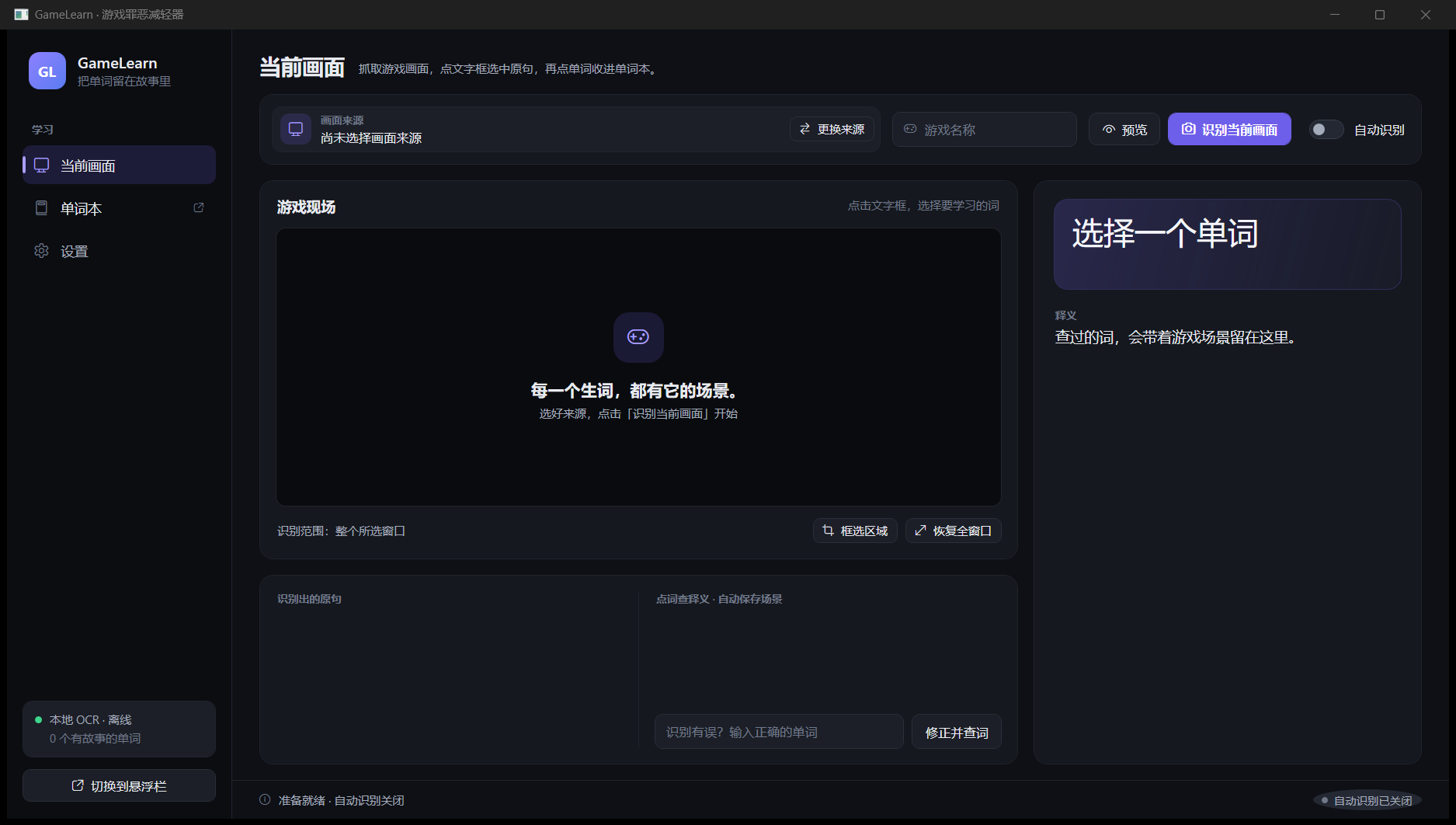
参与者提供 · 非平台独立验证On 2026-10-27, built the current Windows x64 source with dotnet build src/GameLearn/GameLearn.csproj -c Release --no-restore; build succeeded with 0 warnings and 0 errors. Launched the resulting Release executable with a fresh isolated GAMELEARN_DATA_DIR and captured the GameLearn main window to screenshots/gamelearn-main-window.png (1875x1062 PNG). This verifies build and startup/rendering only. No product test suite, live game capture/OCR, hosted OCR, translation or AI request was run for this update. The project and README still identify app version 0.2.10. The local worktree contains uncommitted UI changes; the linked public GitHub revision does not include them. TEST_REPORT.md records earlier historical results: v0.2.9 had 42 automated tests and 34 floating-interface checks pass, Azure Translator short-request verification, and a v0.2.10 launch check showing the saved quick-translation configuration loaded. It also records no real hosted OCR request, unconfirmed AI explanation output quality, and remaining unverified display/font conditions. The current online work had no prior screenshots, external download links or hosted files; this update appends one screenshot and adds no download because no public v0.2.10 package URL is available.
任务说明 · 领取时快照
2026-10-27 11:14
面向 Windows 游戏的英语学习工具:识别画面英文、离线查词,并将词条、原句和场景截图保存为可回顾的学习记录。
问题描述
游戏画面中的英文对话和词语会随场景快速出现,玩家查词后也容易失去原句与画面上下文。GameLearn 将识别、词典查询和场景记录放在同一桌面流程中,供之后回顾。
预期效果
在 Windows x64 上从选定的游戏窗口或 OBS 画面识别英文,使用本地词典查词并保存场景记录;手动和自动识别均可使用。云端 OCR、句子翻译与 AI 语境解释是可选服务。
验收目标
运行 v0.2.10 发布目录中的 GameLearn.exe;选择普通窗口或 OBS 来源后可手动识别或开启自动识别;可使用内置 ECDICT 查词并保存词条、原句和截图;可在词本和最近识别中搜索或回看本地记录;不配置外部 API 密钥时仍可使用本地识别和离线查词。
执行记录
- 脚本
发布已有作品
- 脚本
提交成果
- 脚本
更新成果(第 2 版)
- 脚本
更新成果(第 3 版)
讨论 · 0
登录 后参与讨论